Consider WebToApp when…
You already have a website or static HTML/ZIP and need a signed APK for a demo, internal tool or controlled sharing. You can manage the website yourself and do not need a store package.
Explore the APK workflow →THE DELIVERY DECISION / 01
Start with what your users need to install.
An APK for a small team and an app-store release are different projects. Choose the delivery route first; then decide how much app-building software you need.
Find your route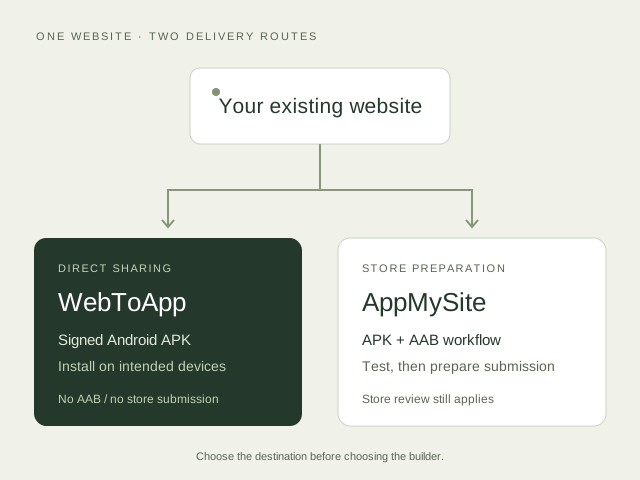
Written by the WebToApp team. Official sources checked 7 November 2026. AppMySite features below are documented capabilities, not hands-on test results. We compare its Web to App offering.
01 / THE SHORT ANSWER
You already have a website or static HTML/ZIP and need a signed APK for a demo, internal tool or controlled sharing. You can manage the website yourself and do not need a store package.
Explore the APK workflow →You need an AAB, an iPhone app-store workflow or app-side capabilities such as push notifications and configurable navigation. Its official product page describes these features; validate your required integrations before buying.
Read its Android build process →02 / COMPARE THE OUTPUT
Start with the recipient’s installation route. A home-screen icon alone does not establish native capabilities or store eligibility.
| Decision | WebToApp | AppMySite |
|---|---|---|
| Android delivery | Signed WebView APK for direct installation. No AAB. | APK for testing and AAB for Google Play submission. Build docs |
| iPhone delivery | Web Clip configuration profile; not an IPA or App Store app. | iPhone app workflow advertised with eligible plans. Plan details |
| Starting material | Live URL, one HTML file or a built static-site ZIP. | Existing website connected to its Web to App builder. Product scope |
| Beyond the website | Desktop launchers; no native push service. Your website supplies the experience. | Push notifications and app-side navigation/customization are advertised. Feature details |
| Store submission | Not included. Choose another workflow if this is required. | Build files support submission; availability is not a guarantee of store approval. Your own Google/Apple developer accounts and their fees are separate. Pricing FAQ |
03 / BUDGET FOR THE RIGHT SCOPE
$29 one-time
One application, 30 successful builds and 365 days of cloud service. Uploaded HTML/ZIP hosting is separate after its 7-day trial. A one-time license does not mean perpetual hosting.
Check current limits and hosting →$69 / month, Starter
Monthly Starter lists Android; monthly Pro lists Android and iPhone at $129/month. Annual billing shows lower monthly equivalents. AppMySite also offers lifetime plans; review those terms if you prefer a one-time payment. These are different billing commitments, not directly equivalent packages.
Check current plans and billing →04 / A CHECK YOU CAN REPEAT
We ran WebToApp’s local HTML preflight on our Sunday List example on 7 November 2026. This checks packaging readiness, not native-app behavior.
sunday.html.Test boundary: no APK was built or installed for this comparison, and no AppMySite build was tested. The example has no login or checkout. A passing input check cannot validate those flows or promise offline operation.
05 / MAKE THE CALL
If your requirement says “send a working Android demo to five colleagues,” start with WebToApp’s free build and test on their devices. If it says “release on Google Play and the App Store,” investigate AppMySite’s eligible plan and submission requirements first. WebToApp does not cover that delivery route.
For either option, confirm that you own or have permission to package the site, and test the actual user journey. Neither a comparison table nor a preview replaces device testing.
No. WebToApp produces a signed Android WebView APK, an iOS Web Clip and desktop launchers. It does not produce an AAB or IPA and does not submit apps to stores. AppMySite is the more relevant option to investigate when store distribution is required.
Yes. WebToApp allows one successful free build per account with Android downloads and branding. AppMySite documents one free Android build containing APK and AAB files. Its free-plan documentation gives conflicting statements about publishing; confirm the entitlement with AppMySite before planning a store release.
No. It checks the input file for common packaging problems. It does not test login, payments, device permissions, offline behavior or installation. Test those flows separately on your intended devices.