
Signed out
Open a private deep link. Sign in or cancel. Does the app explain what happened, and can the user still navigate?
THE JOURNEY CHECK
Your homepage loaded.
Can your customer finish the task?
For a site with accounts, checkout or private pages, the important test starts after the first screen. Choose between a lightweight web-content package and Appilix’s configurable native features by walking through login, return navigation and delivery.
Start with the acceptance checklist ↓By the WebToApp team · Official sources checked 10 November 2026 · No Appilix build or native installation was tested. Our local redirect demonstration is labeled separately.
01 / DEFINE “WORKS”
Open a private deep link. Sign in or cancel. Does the app explain what happened, and can the user still navigate?
Complete the intended task, then use Back and a navigation tab. Does the tab match the page? Is a second menu covering the website’s controls?
Return after the session ends. Can the user sign in again and resume the task without a redirect loop or lost destination?
These are recommended acceptance checks for your own site, not completed tests or reported defects in either product.
02 / CONFIGURATION IS PART OF THE PRODUCT
| Requirement | WebToApp | Appilix |
|---|---|---|
| Existing website flow | Packages URL or uploaded HTML/ZIP. Test the site’s own account and navigation behavior inside the APK. | Loads the website with configurable native features. A mobile preview is a starting point, not proof every account flow works. |
| Native Google login | No equivalent Appilix-native sign-in module promised. | Requires a website bridge integration and backend ID-token verification. It does not automatically take over the existing button. Login docs |
| Native tabs | The website supplies its own navigation; no equivalent Appilix bottom-tab configuration promised. | Bottom tabs have action URLs and URL-based visibility rules, plus runtime updates. Navigation docs |
| Android delivery | Signed WebView APK for direct installation; no AAB. | Documents APK for testing/direct installation and AAB for Play submission. Build docs |
| iOS delivery | Web Clip profile, not IPA or App Store submission. | Documents an iOS build workflow, with App Store Connect upload after code-signing setup and TestFlight testing. iOS workflow |
03 / OBSERVED LOCALLY
We ran a small local HTTP server with a deliberately fake login route. Two requests followed real HTTP redirects. Without a return path, the request ended at the homepage. Preserving it ended at the intended order page. No credentials or authentication were involved.
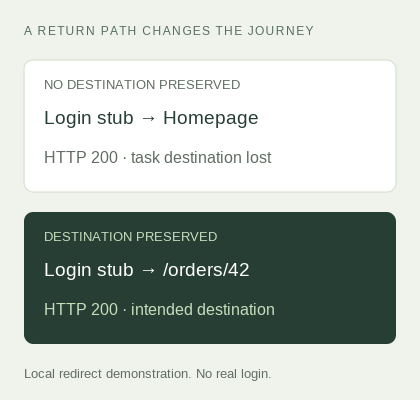
The useful lesson: “the page opens” is a weaker acceptance criterion than “the user resumes the task.” This is an illustrative redirect experiment, not a measured difference between the two services.
Our experiment covered local HTTP redirects only. It did not test cookies, OAuth, browser history, native tabs, either builder or installation. Use your own application’s supported return-path handling; the stub is not production authentication code.
04 / KEEP NAVIGATION IN CONTEXT
Appilix documents hiding or showing bottom navigation by URL and assigning each tab an action URL. That is useful when login and checkout need a focused screen. Write down those routes before configuring the bar, including success, cancellation and error destinations. Visibility rules
For WebToApp, make that journey work with the website’s navigation first. Choose Appilix when its native configuration solves a concrete requirement and you can implement and test the integration. Neither choice repairs a broken website session automatically.
05 / PRICE THE PLATFORM YOU NEED
$29 one-time · USD
One application, 30 successful builds and 365 days of cloud service. Uploaded-site hosting is separate after the 7-day trial. Free includes one successful build with Android downloads and branding.
Current limits →$59 Android promotional price · one-time
On 10 November, Appilix advertised Black Friday pricing: Android Standard $59 (crossed-out $119), iOS Standard $79 (crossed-out $149). These are separate platform plans. Its Free plan is a 15-day trial with limited rebuilds and users.
Verify current prices and plan scope →Promotions can end. The quoted Appilix price is a dated USD snapshot, not a permanent price or a quote for publishing services. Check the selected platform, plan and checkout before purchase.
Start with WebToApp if your site already provides the experience and you need controlled Android APK sharing or desktop launchers. It does not provide AAB, native iOS output, native push service or Appilix module compatibility.
Investigate Appilix if native navigation, native sign-in integrations or an Android/iOS store-build workflow are requirements. Budget for configuration and website/backend integration, then validate on devices rather than trusting the homepage preview.
No. Its Google Sign-In documentation explicitly requires a website integration: trigger native sign-in through its bridge, then send the returned ID token to your backend for verification. Keep a separate normal-browser login path.
No. WebToApp packages web content into a signed Android WebView APK and other supported formats. It does not promise Appilix-native sign-in or bottom-navigation module compatibility. Validate your existing website journey on actual devices.
No. Test the installed app, including expired sessions, canceling login, returning to the intended page, back navigation and the distribution method your users will use. The redirect experiment on this page is not a native authentication test.