Check where your files will live, whose branding appears and what arrives in the download. Those three answers matter more than a generic promise to “turn HTML into an app.”
By the WebToApp team · Checked 9 November 2026 · Competitor: www.webintoapp.com, not webinto.app. Official descriptions below are not hands-on competitor test results.
01 / FOLLOW THE FILES
Does the app fetch the site—or carry the files?
WEBTOAPP
Uploaded content is hosted.
Use a URL, one HTML file or a built static ZIP. WebToApp’s signed Android WebView APK opens web content; uploaded files use hosted storage. The upload’s 7-day hosting trial is separate from the app license. Do not promise offline use.
The official HTML guide describes placing HTML, JavaScript and CSS into a WebView app. It requires index.html at the ZIP root. Its guide excludes server-side PHP/MySQL execution. These are documented claims, not a verified build from our team.
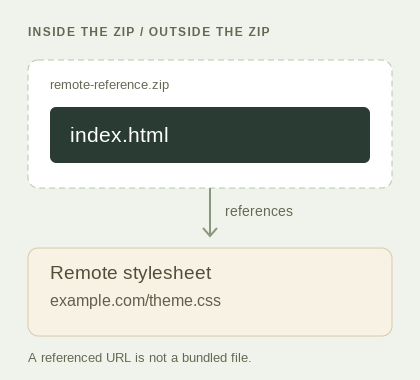
We zipped one file. One dependency stayed outside.
We created a real ZIP containing this deliberately minimal HTML reference, reopened the archive and inspected its contents. The result demonstrates a packaging boundary—not offline behavior in either product.
Original dependency diagram; not a product screenshot.
Observed, 9 November 2026
Archive size
335 bytes
Files inside
index.html only
Remote references
1 stylesheet URL
Native builds tested
None
The example.com address is an illustrative dependency, not a claimed working stylesheet. No network request, browser render or app installation was performed.
Repeat it with your project before choosing a plan.
Extract a copy of your ZIP. Check that the top level contains the built index.html, not just source files or a development project.
Inspect HTML/CSS references and JavaScript requests. List remote fonts, images, API calls and sign-in services. Text search is a starting point; dynamically generated URLs need runtime inspection.
Separate files you can include locally from services that must remain online. Neither ZIP compression nor a native shell replaces your backend.
For an offline requirement, test a fresh installation with connectivity disabled—not just a previously cached session. Check navigation, fonts, stored data and the main user task. We have not performed that device test here.
03 / READ THE DOWNLOAD LABEL
An APK, a source project and a Web Clip are different handoffs.
Deliverables compared. Scroll sideways on small screens.
Handoff
WebToApp
WebIntoApp
Android
Signed WebView APK. No AAB or app-store submission service.
Homepage lists release APK + AAB for Free. Dedicated additionally lists keystore and source code. Deliverables
iOS
Web Clip configuration profile; not an IPA.
Dedicated supplies iOS source code. Its guide requires a Mac/Xcode compilation workflow. iOS guide
Desktop
Paid formats include macOS app bundle and Windows/Linux launchers, not a native Windows EXE.
The reviewed plan describes mobile outputs. Do not assume desktop launchers are included.
After downloading
Keep your website available. Uploaded content requires active hosting.
Keep the delivered project and signing materials safely backed up; confirm your update workflow before release.
WebIntoApp’s iOS guide still references older tested tool versions. Confirm current compatibility before buying; we have not compiled its supplied project. Source delivery is not a promise of store approval.
04 / FREE DOES NOT MEAN UNBRANDED
Test the recipient’s experience, not just the price.
WebToApp
$29 Single App · one-time · USD
Free includes one successful build per account, Android downloads and WebToApp branding. Single App includes 30 successful builds and 365 days of cloud service. Hosting for uploads is separate after its trial.
The Free plan lists its company name and advertising; Dedicated lists your company name and optional own AdMob. ZIP limits are 2 MB Free / 100 MB Dedicated. Download backups are listed as 7 / 365 days.
For a client handoff, record the visible app name, icon, loading screen and any advertising in your acceptance checklist. Confirm package identity and update/signing ownership. These are recommended checks, not claims that we inspected either service’s generated binary today.
THE PRACTICAL CHOICE
Choose by the deliverable you can support.
Start with WebToApp for hosted website packaging and controlled Android APK sharing, with optional desktop launchers. Accept that uploaded content needs hosting and iOS is a Web Clip.
Investigate WebIntoApp if your shortlist depends on bundled HTML, an AAB or source-code delivery. Confirm branding, final plan terms and the work needed to compile and maintain the delivered project.
This page covers www.webintoapp.com, the website and HTML-to-app service. It does not describe the similarly named webinto.app.
Does uploading a ZIP make an app work offline?
No. A ZIP can still contain HTML that references remote stylesheets, images, APIs or login services. Inspect dependencies, then test the built app with connectivity disabled. WebToApp serves uploaded sites from hosting; WebIntoApp documents a bundled HTML workflow, which still requires testing your actual dependencies.
Is WebIntoApp’s iOS download a ready-to-install IPA?
Its official Dedicated plan describes iOS source code, with compilation in Xcode on a Mac. Do not assume that receiving source code means receiving a signed, installable IPA. WebToApp instead produces an iOS Web Clip, not an IPA.